
Create an Emergency Speed Restriction
Top Section
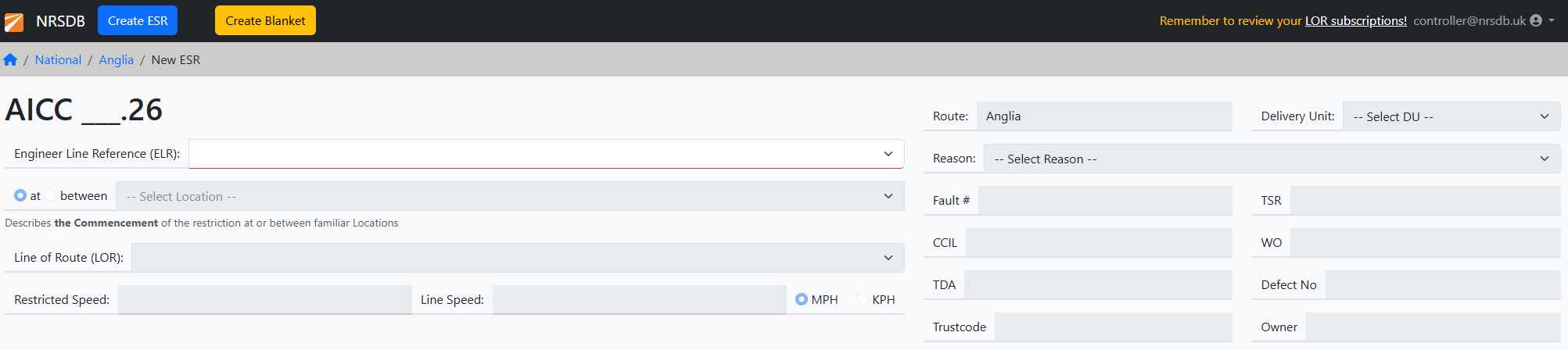
Reference Number (refnum)
Each ESR has a reference number.number which will be added when you Impose. It is constructed as follows;
XXXX nnn{a}.yy
XXXX = Route specific prefix (AICC = Anglia, etc)
nnn = Annual sequence number, starts over at 001 each year on 1st January
yy = two digit year, e.g. 24
a = the amendment (if any), A, B, C, etc
AICC 123B.24 is the 123rd restriction of 2024 on the Anglia route and has been amended twice.
Top Level Information
- Engineers Line Reference (ELR) – Select from the available list (type the ELR code to filter). We do not limit the selection of ELR based on the Route. Be careful to choose the correct ELR!
-
Line of Route – select the LOR from the options that relate to the ELR Location -- see below
-
ReasonLine of Route –selectonceappropriateyoureasonhavecodeselected the Location the options are reduced. In most cases there's only one possible LOR at each Location. Speed – use the standard format and select MPH or KPH – e.g. “40/60” or “50”
- Line Speed (optional) - record the normal Line Speed at this location.
Location
The "Location" gives the driver a familiar place for the start of the restriction. We offer a set of standard LocationLocations based on the selected ELR. In some cases the noteablethese locations might be quite far apart so choose the "between" option.
If there's a Location you wish to add please email us at help@nrsdb.uk - we will need the Location Name, ELR, LOR and Mileage.
Reference Fields
These fields can be changed later without needing to issue an amendment since they are internal Network Rail properties.
- Delivery Unit (required) – select from the available list, each Controller is associated with a specific Route so the options here are particular to that Route
-
Reason (required) – select appropriate reason code
- Fault# (required) – FMS or MyIM reference. Can enter multiple references separated by space
- CCIL (required) – seven numeric characters - must be completed
- TDA
- TSR – reference to a TSR when it is converted to ESR
- WO
- Defect No
- TRUST Code
-
Owner
Line Cards
Primary
Use Linethe Add Board form to record the position of the various Boards. You must specify the Speed Indicator and Termination boards, other boards are encouraged.
This section remains locked until you have completed the essential References.
You must define the Speed Indicator first. The ELR for this MUST match that selected in the Top Section and so this field is locked.
First select the appropriate TrackID (e.g. 2100: Down Main). If there is only one valid option it will be selected automatically.
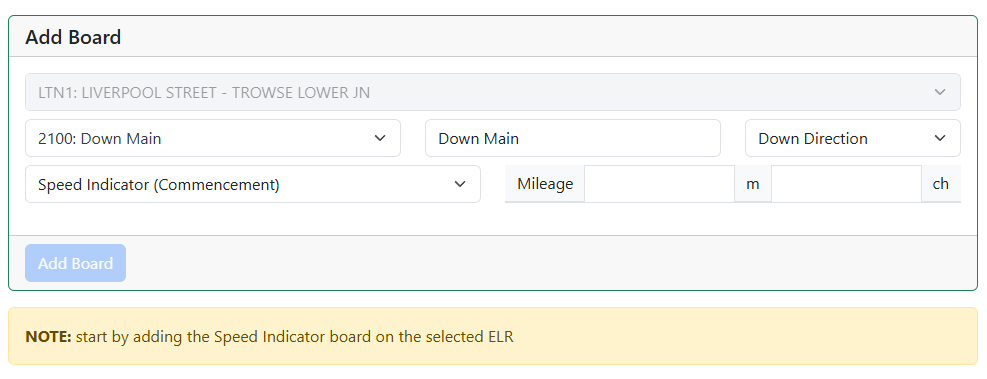
The Primarynext Linefields MUST containare the CommencementDescription Board!
- Direction.
ELRWe–attemptthistoisgiveinsertedsensibleautomaticallydefaults based on theELRselectedinTrackID but you can override them where necessary. BUT be sure to do this while defining thetopSpeedsection.Indicator.It cannot be changedTrack ID – 4 digits, for example 1100 = “Up Main” …. the impacted ELRThere is
nowthreehighlighted on the mapLine – we automatically apply the standard description based on the Track ID given. You are allowed to change this but we suggest otherwiseDirectionvariants ofTravelSpeed–Indicator (select fromUpSpeedDirectionIndicator (Commencement), Speed Indicator + RH Arrow, or Speed Indicator + LH Arrow) andDown Direction. This affectsgive thesortingMilesorderandofChains,Boards!click - Add Board.
Add Boards with their mileage
NOTE: after adding a board it will appear on the map – if the mileage is validRepeat for the ELRTermination and Track IDBoard.
You can disable the Map to allow mileages that the system rejects. Since the Map will not work, you must upload your own track diagram.
Additional Line Cards
If you have boards that is not on the Primary Line (ELR or TrackID), you mustNow add another Additional Line
This section is essentially the same as the Primary, except here you can choose the appropriate ELR.boards.
Remarks Section
There are two optional fields for adding comments.
"Notes to Drivers" will appear on the Notice that is used by Operating companies.